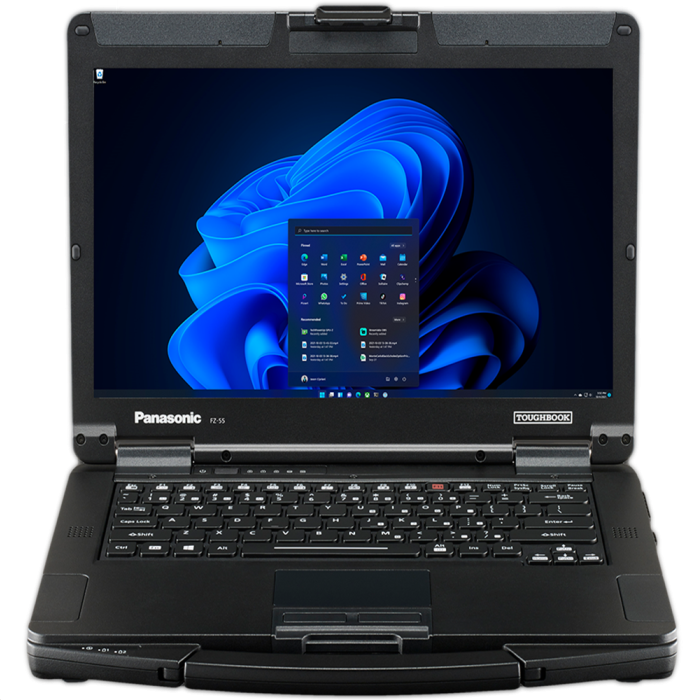
Buying a rugged computer involves more than selecting a processor and placing an order. The computer must support the applications, working conditions, peripherals, and daily routines of its users. The Panasonic Toughbook FZ 56 offers several configuration choices, making it important for buyers to identify their operational requirements before deciding which features to include.
Start With the Working Environment
A field computer should be selected according to where employees will use it. A warehouse manager, utility technician, construction supervisor, and public safety employee may all need rugged hardware, but their display, connectivity, and power requirements can differ considerably.
Before comparing configurations, determine whether the computer will face:
- Frequent outdoor use
- Direct sunlight or changing light levels
- Dust, dirt, rain, or humidity
- Vehicle vibration
- Repeated transportation between sites
- Limited access to charging outlets
- Use with gloves
- Connections to specialized equipment
This assessment can prevent businesses from paying for unnecessary additions while ensuring that essential features are not overlooked.
Select the Appropriate Display
The display affects how easily employees can read information and interact with their applications. The FZ 56 is available with different screen choices, including non-touch and multi-touch configurations.
A non-touch display may be suitable for employees who primarily use a keyboard and mouse in an office, warehouse, or vehicle. It may also fit organizations whose software is not designed for touch input.
The available 14-inch WUXGA, 1,000-nit gloved multi-touch display is better suited to employees who work outdoors or need direct screen interaction. Its high brightness can support visibility in strong light, while glove-compatible input can help workers remain productive without repeatedly removing protective equipment.
A touchscreen configuration may be useful for:
- Completing digital inspection forms
- Collecting customer signatures
- Reviewing maps and site plans
- Selecting controls while standing
- Entering data inside a vehicle
- Working in cold or hazardous environments where gloves are required
Buyers should also determine whether employees need a stylus for signatures, handwritten notes, or more precise input.
Match Memory to the Applications
Memory requirements should be based on the programs employees run at the same time. Basic browser-based tools, email, and document applications may need less memory than mapping systems, engineering software, video applications, or large databases.
The FZ 56 provides RAM configuration choices, but its memory slots must be balanced. Buyers should therefore plan memory capacity at the time of purchase rather than treating it as an isolated upgrade.
Consider the following questions:
- How many applications will employees run simultaneously?
- Do any programs have high recommended memory requirements?
- Will the computer handle mapping, video, or design files?
- How long does the organization expect to use the device?
- Could future software require additional capacity?
Choosing enough memory for both current and foreseeable workloads can help the computer remain useful through a longer deployment period.
Plan Storage Around Field Data
Solid-state storage capacity should reflect the amount and type of information kept on the computer. Employees working mainly through cloud platforms may need less local space. Teams storing photographs, inspection videos, mapping files, equipment records, or offline databases may require more.
The FZ 56 supports quick-release solid-state drive options and storage choices associated with its expansion areas. This can be useful when an organization needs removable storage, additional capacity, or separate drives for different workflows.
When selecting storage, review:
- The size of the operating system and required applications
- Expected growth in local records
- Offline data requirements
- Security policies
- Backup procedures
- Whether drives must be removed between shifts or projects
Storage decisions should also align with the organization’s data protection and device management policies.
Review the Expansion Areas
One of the most important configuration considerations is how the computer will connect to field equipment. The FZ 56 offers expansion areas on the left, right, and rear of the device. Some components use a quick-release design, allowing the hardware to be configured around specific job requirements.
The correct options depend on the employee’s equipment and workflow. Potential requirements may include:
- Additional connection ports
- Secondary storage
- Specialized communication hardware
- Smart card or security components
- Interfaces for older field equipment
- Connections for external displays or peripherals
Procurement teams should speak with software administrators and frontline employees before choosing these components. A missing port can interfere with an otherwise suitable deployment.
Check Wireless and Mobile Connectivity
Employees who work away from company facilities need a reliable way to access records, send reports, and communicate with supervisors. Wi-Fi may be enough inside offices and warehouses, but it may not cover construction sites, roadside work areas, or remote service locations.
A mobile broadband option such as 4G LTE may help employees maintain access while traveling or working beyond established networks. Before adding cellular connectivity, confirm carrier support, coverage in normal service areas, data-plan requirements, and antenna needs.
Organizations should also review whether the computer must support:
- Bluetooth accessories
- GPS-based applications
- Mobile printers
- Barcode scanners
- External antennas
- Vehicle networking equipment
Prepare for Vehicle and Remote Use
Power requirements should reflect the length and location of each shift. Employees who remain near office outlets may only require a standard AC adapter. Mobile workers may also need an additional adapter for another facility or a DC adapter for vehicle charging.
Useful power planning questions include:
- How long will the device operate away from an outlet?
- Will employees share computers across shifts?
- Does each vehicle require its own charger?
- Will power-intensive applications run continuously?
- Are spare adapters needed at multiple locations?
Providing the correct charging equipment can reduce battery-related interruptions and eliminate the need to move adapters between workstations and vehicles.
Review Warranty and Protection Choices
Rugged construction reduces certain risks, but no computer is immune to accidents or component problems. Buyers should review standard warranty terms, extended warranty options, and available no-fault protection before completing an order.
Coverage may be particularly valuable when computers are assigned to multiple employees, used around heavy equipment, or deployed in locations where repairs could cause long delays. The cost of protection should be compared with the potential expense of repair, replacement, shipping, and employee downtime.
Build a Configuration Around the Job
The right FZ 56 configuration should reflect the applications, environment, accessories, and working hours of its users. Before ordering, confirm display type, stylus needs, memory, storage, expansion components, mobile connectivity, power adapters, and warranty coverage. Organizations ready to configure an FZ 56 for field operations can visit Rugged Computing, Inc to compare available options, request a quote, and receive help selecting hardware that matches their deployment requirements.